Settings
Open Configure Settings → Minion!.
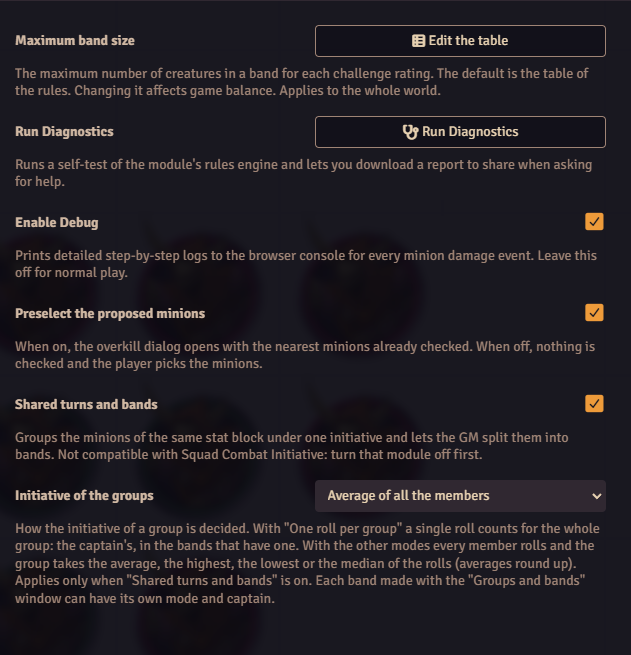
| Setting | Applies to | Default | What it does |
|---|---|---|---|
| Preselect the proposed minions | the world | on | The overkill dialog opens with the nearest minions checked. When off, nothing is checked and the player picks. The limit on how many can be checked still applies. |
| Shared turns and bands | the world | off | Turns on automatic groups, the Groups and bands window, shared turns and band colors. Doesn't work while Squad Combat Initiative is active. |
| Initiative of the groups | the world | One roll per group (the captain's) | How a group's initiative is decided: the captain's roll, or the average, highest, lowest or median of every member's roll. Only matters while shared turns and bands is on. Each band can use its own mode. See Initiative and captains. |
| Maximum band size | the world | the default table | Edit the table opens the band size table. GM only. |
| Enable Debug | this browser | off | Logs every damage event on a minion, step by step, in the browser console. Turn it on when you report a bug. |
| Run Diagnostics | Runs a self-test of the rules engine and lets you save a report. Any user can run it. See Reporting a bug. |
Language
The interface is in English and Italian. Foundry shows each user the language they picked.